ILIAS exams access for teachers during restricted access periods
During Chromebook exams, the ILIAS exam system can only be accessed via the Chromebooks in the exam room. An overview of these exam times (restricted access periods) can be found here:
https://wiki.uni-konstanz.de/e-learning/index.php/Sperrzeiten_auf_dem_Klausur-ILIAS
To avoid restrictions for teachers who want to prepare or evaluate their ILIAS exam during these restricted access periods, we offer an additional profile with a VPN connection that allows them to access ILIAS exams even during these blocked periods. Here we show you how to set up and use this VPN connection.
1. Get VPN access for exam administrators
If you have requested an online exam or online test and we have set up the course for you on the ILIAS exams platform, we can also activate your VPN access for exam administrators. If this has not yet been done or if other people are to be given access (e.g., administrative staff, tutors, etc.), please send us an e-mail at ilias-support@uni-konstanz.de
2. Installing the eduVPN app
If you have already installed and configured the eduVPN app for ‘normal’ VPN access, you can skip this step and continue with section 4 in these instructions. If you have not yet set up eduVPN on your device, please follow these instructions.
3. Updating your eduVPN configuration
If you have installed the eduVPN app for the first time now as described in the previous step, you can skip this section. However, if you are already using eduVPN, you may need to transfer your VPN profiles to the app again. To do this, first delete the previous app configuration by clicking on the "back" icon in the upper left corner of the app. Then reconfigure the app: Enter “Konstanz” in the app's input field and select “University Konstanz” in the “Institute Access” section. You will then be redirected to our eduVPN portal page and prompted to log in with your university account. After that you will be asked to confirm the update of your profile.

4. Activating eduVPN access for exam administrators
- Start the eduVPN app (if you have not already done so).
- Turn off the VPN connection if it was activated when you started the app.
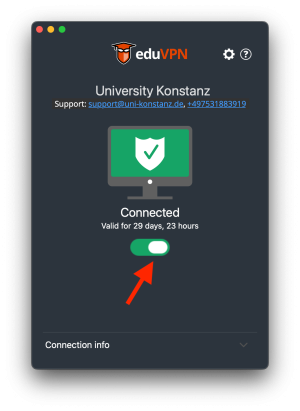
- Select the profile "Ilias Klausurenverantwortliche".
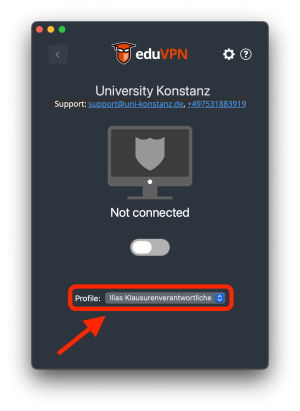
- Turn on the VPN connection. You will then have access to the ILIAS exam system even during ongoing Chromebook exams.


5. Disabling eduVPN access for exam administrators
VPN access for exam administrators should only be used to access the exam ILIAS during restricted access periods. Please deactivate this profile when you are no longer working on the ILIAS exams system during the restricted access periods:
- Turn off the VPN connection.
- Select the “Remote Access VPN” profile for your ‘normal’ VPN access.