ILIAS exams access for teachers during restricted access periods
During Chromebook exams, the ILIAS exam system can only be accessed via the Chromebooks in the exam room. An overview of these exam times (restricted access periods) can be found here:
https://wiki.uni-konstanz.de/e-learning/index.php/Sperrzeiten_auf_dem_Klausur-ILIAS
To avoid restrictions for teachers who want to prepare or evaluate their ILIAS exams during these restricted access periods, we offer an additional profile with a VPN connection that allows them to access ILIAS exams even during these blocked periods. Here we show you how to set up and use this VPN connection.
1. Get VPN access for exam administrators
If you have requested an online exam or online test and we have set up the course for you on the ILIAS exam platform, we can also activate your VPN access for exam administrators. If this has not yet been done or if other people are to be given access (e.g., administrative staff, tutors, etc.), please send us an e-mail at ilias-support@uni-konstanz.de
2. Installing the eduVPN app
WIf you have already installed and configured the eduVPN app for ‘normal’ VPN access, you can skip this step and continue with section 4 in these instructions. If you have not yet set up eduVPN on your device, please follow these instructions.
3. Updating your eduVPN configuration
Falls Sie im vorangegangenen Schritt die VPN-App erstmals installiert haben, können Sie diesen Abschnitt überspringen. Wenn Sie jedoch bereits eduVPN nutzen, müssen Sie ggf. ihre VPN-Profile neu in die App übertragen. Löschen Sie dazu zunächst die bisherige App-Konfiguration, indem Sie in der App oben rechts auf das Zahnrad-Symbol klicken und "Reset App" auswählen. Konfigurieren Sie danach die App neu: Tragen Sie im Eingabefeld der App "Konstanz" ein und wählenn Sie im Bereich "Institute Access" "University Konstanz" aus. Danach werden Sie auf unsere eduVPN-Portalseite geleitet und es erfolgt eine Aufforderung zur Anmeldung mit Ihrem Uni-Account, nach der Sie die Aktualisierung Ihres Profils bitte bestätigen.

4. Activating eduVPN access for exam administrators
- Starten Sie die eduVPN-App (sofern diese nicht bereits in Schritt 2 gestartet wurde).
- Schalten Sie die VPN-Verbindung aus, falls diese beim Start der App aktiviert wurde.
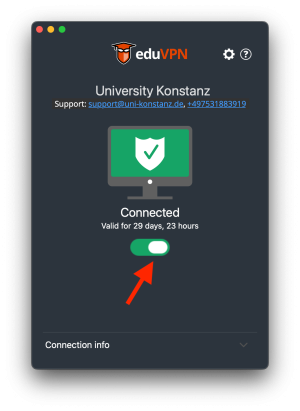
- Wählen Sie das Profil "Ilias Klausurverantwortliche" aus.
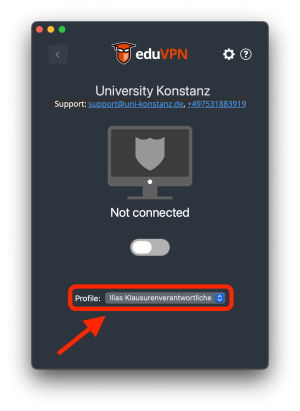
- Schalten Sie die VPN-Verbindung ein. Sie haben dann Zugang zum Klausur-ILIAS auch während laufender Chromebook-Klausuren.


5. Disabling eduVPN access for exam administrators
Der VPN-Zugang für Klausurverantwortliche sollte nur für den Zugang zum Klausur-ILIAS während der Sperrzeiten genutzt werden. Bitte deaktivieren Sie dieses Profil, wenn Sie nicht mehr während der Sperrzeiten auf dem Klausur-ILIAS arbeiten:
- Schalten Sie die VPN-Verbindung aus.
- Wählen Sie das Profil "Remote Access VPN" für den 'normalen' VPN-Zugang.